- 所有已实现的接口:
ImageObserver,MenuContainer,Serializable,Accessible
Quit”按钮在 Solaris 操作系统下的三个视图:
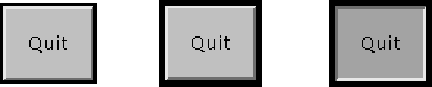
第一个视图显示正常显示的按钮。第二个视图在具有输入焦点时显示按钮。它的轮廓变暗,让用户知道它是一个活动对象。第三个视图显示当用户在按钮上单击鼠标时的按钮,从而请求执行某个操作。
用鼠标单击按钮的手势与 ActionEvent 的一个实例相关联,当鼠标在按钮上按下和释放时发送。如果应用程序有兴趣了解按钮何时被按下但未释放,作为一个单独的手势,它可以专门化 processMouseEvent ,或者它可以通过调用 addMouseListener 将自己注册为鼠标事件的监听器。这两种方法都由所有组件的抽象超类 Component 定义。
当按下并释放按钮时,AWT 通过在按钮上调用 processEvent 将 ActionEvent 的实例发送到按钮。按钮的processEvent方法接收按钮的所有事件;它通过调用自己的 processActionEvent 方法来传递动作事件。后一种方法将动作事件传递给任何已注册对此按钮生成的动作事件感兴趣的动作监听器。
如果应用程序想要根据按下和释放按钮执行某些操作,它应该实现 ActionListener 并通过调用按钮的 addActionListener 方法注册新的监听器以接收来自该按钮的事件。应用程序可以使用按钮的操作命令作为消息传递协议。
- 自从:
- 1.0
- 参见:
-
内部类总结
内部类 -
字段摘要
在类 java.awt.Component 中声明的字段
accessibleContext, BOTTOM_ALIGNMENT, CENTER_ALIGNMENT, LEFT_ALIGNMENT, RIGHT_ALIGNMENT, TOP_ALIGNMENT在接口 java.awt.image.ImageObserver 中声明的字段
ABORT, ALLBITS, ERROR, FRAMEBITS, HEIGHT, PROPERTIES, SOMEBITS, WIDTH -
构造方法总结
构造方法 -
方法总结
修饰符和类型方法描述void添加指定的动作监听以接收来自此按钮的动作事件。void创建按钮的对等体。获取与此Button关联的AccessibleContext。返回此按钮触发的动作事件的命令名称。返回在此按钮上注册的所有动作监听的数组。getLabel()获取此按钮的标签。<T extends EventListener>
T[]getListeners(Class<T> listenerType) 返回当前在此Button上注册为FooListener的所有对象的数组。protected String返回表示此Button状态的字符串。protected void通过将此按钮上发生的动作事件分派给任何已注册的ActionListener对象来处理它们。protected void处理此按钮上的事件。void移除指定的动作监听,使其不再接收来自该按钮的动作事件。voidsetActionCommand(String command) 设置此按钮触发的动作事件的命令名称。void将按钮的标签设置为指定的字符串。在类 java.awt.Component 中声明的方法
action, add, addComponentListener, addFocusListener, addHierarchyBoundsListener, addHierarchyListener, addInputMethodListener, addKeyListener, addMouseListener, addMouseMotionListener, addMouseWheelListener, addPropertyChangeListener, addPropertyChangeListener, applyComponentOrientation, areFocusTraversalKeysSet, bounds, checkImage, checkImage, coalesceEvents, contains, contains, createImage, createImage, createVolatileImage, createVolatileImage, deliverEvent, disable, disableEvents, dispatchEvent, doLayout, enable, enable, enableEvents, enableInputMethods, firePropertyChange, firePropertyChange, firePropertyChange, firePropertyChange, firePropertyChange, firePropertyChange, firePropertyChange, firePropertyChange, firePropertyChange, getAlignmentX, getAlignmentY, getBackground, getBaseline, getBaselineResizeBehavior, getBounds, getBounds, getColorModel, getComponentAt, getComponentAt, getComponentListeners, getComponentOrientation, getCursor, getDropTarget, getFocusCycleRootAncestor, getFocusListeners, getFocusTraversalKeys, getFocusTraversalKeysEnabled, getFont, getFontMetrics, getForeground, getGraphics, getGraphicsConfiguration, getHeight, getHierarchyBoundsListeners, getHierarchyListeners, getIgnoreRepaint, getInputContext, getInputMethodListeners, getInputMethodRequests, getKeyListeners, getLocale, getLocation, getLocation, getLocationOnScreen, getMaximumSize, getMinimumSize, getMouseListeners, getMouseMotionListeners, getMousePosition, getMouseWheelListeners, getName, getParent, getPreferredSize, getPropertyChangeListeners, getPropertyChangeListeners, getSize, getSize, getToolkit, getTreeLock, getWidth, getX, getY, gotFocus, handleEvent, hasFocus, hide, imageUpdate, inside, invalidate, isBackgroundSet, isCursorSet, isDisplayable, isDoubleBuffered, isEnabled, isFocusable, isFocusCycleRoot, isFocusOwner, isFocusTraversable, isFontSet, isForegroundSet, isLightweight, isMaximumSizeSet, isMinimumSizeSet, isOpaque, isPreferredSizeSet, isShowing, isValid, isVisible, keyDown, keyUp, layout, list, list, list, list, list, locate, location, lostFocus, minimumSize, mouseDown, mouseDrag, mouseEnter, mouseExit, mouseMove, mouseUp, move, nextFocus, paint, paintAll, postEvent, preferredSize, prepareImage, prepareImage, print, printAll, processComponentEvent, processFocusEvent, processHierarchyBoundsEvent, processHierarchyEvent, processInputMethodEvent, processKeyEvent, processMouseEvent, processMouseMotionEvent, processMouseWheelEvent, remove, removeComponentListener, removeFocusListener, removeHierarchyBoundsListener, removeHierarchyListener, removeInputMethodListener, removeKeyListener, removeMouseListener, removeMouseMotionListener, removeMouseWheelListener, removeNotify, removePropertyChangeListener, removePropertyChangeListener, repaint, repaint, repaint, repaint, requestFocus, requestFocus, requestFocus, requestFocus, requestFocusInWindow, requestFocusInWindow, requestFocusInWindow, reshape, resize, resize, revalidate, setBackground, setBounds, setBounds, setComponentOrientation, setCursor, setDropTarget, setEnabled, setFocusable, setFocusTraversalKeys, setFocusTraversalKeysEnabled, setFont, setForeground, setIgnoreRepaint, setLocale, setLocation, setLocation, setMaximumSize, setMinimumSize, setMixingCutoutShape, setName, setPreferredSize, setSize, setSize, setVisible, show, show, size, toString, transferFocus, transferFocusBackward, transferFocusUpCycle, update, validate
-
构造方法详细信息
-
Button
构造一个标签为空字符串的按钮。- 抛出:
HeadlessException- 如果 GraphicsEnvironment.isHeadless() 返回 true- 参见:
-
Button
构造具有指定标签的按钮。- 参数:
label- 按钮的字符串标签,或null无标签- 抛出:
HeadlessException- 如果 GraphicsEnvironment.isHeadless() 返回 true- 参见:
-
-
方法详情
-
addNotify
public void addNotify()创建按钮的对等体。按钮的同位体允许应用程序更改按钮的外观而不更改其功能。 -
getLabel
获取此按钮的标签。- 返回:
-
按钮的标签,如果按钮没有标签,则为
null。 - 参见:
-
setLabel
将按钮的标签设置为指定的字符串。- 参数:
label- 新标签,如果按钮没有标签则为null。- 参见:
-
setActionCommand
设置此按钮触发的动作事件的命令名称。默认情况下,此操作命令设置为匹配按钮的标签。- 参数:
command- 用于设置按钮动作命令的字符串。如果字符串是null则动作命令被设置为匹配按钮的标签。- 自从:
- 1.1
- 参见:
-
getActionCommand
返回此按钮触发的动作事件的命令名称。如果命令名称是null(默认值),则此方法返回按钮的标签。- 返回:
- 此按钮的操作命令名称(或标签)
-
addActionListener
添加指定的动作监听以接收来自此按钮的动作事件。当用户在此按钮上按下或释放鼠标时,将发生操作事件。如果 l 为 null,则不会抛出异常并且不会执行任何操作。有关 AWT 线程模型的详细信息,请参阅 AWT 线程问题。
- 参数:
l- 动作监听器- 自从:
- 1.1
- 参见:
-
removeActionListener
移除指定的动作监听,使其不再接收来自该按钮的动作事件。当用户在此按钮上按下或释放鼠标时,将发生操作事件。如果 l 为 null,则不会抛出异常并且不会执行任何操作。有关 AWT 线程模型的详细信息,请参阅 AWT 线程问题。
- 参数:
l- 动作监听器- 自从:
- 1.1
- 参见:
-
getActionListeners
返回在此按钮上注册的所有动作监听的数组。- 返回:
-
此按钮的所有
ActionListener或空数组(如果当前没有注册任何动作监听器) - 自从:
- 1.4
- 参见:
-
getListeners
返回当前在此Button上注册为FooListener的所有对象的数组。FooListener是使用addFooListener方法注册的。您可以使用类文字指定
listenerType参数,例如FooListener.class。例如,您可以使用以下代码查询Button b的动作监听器:ActionListener[] als = (ActionListener[])(b.getListeners(ActionListener.class));
如果不存在这样的监听器,则此方法返回一个空数组。- 重写:
getListeners在类Component中- 类型参数:
T- 监听器的类型- 参数:
listenerType- 请求的监听器类型;此参数应指定从java.util.EventListener派生的接口- 返回:
-
在此按钮上注册为
FooListener的所有对象的数组,如果没有添加此类监听器,则为空数组 - 抛出:
ClassCastException- 如果listenerType没有指定实现java.util.EventListener的类或接口- 自从:
- 1.3
- 参见:
-
processEvent
处理此按钮上的事件。如果事件是ActionEvent的实例,则此方法调用processActionEvent方法。否则,它会在超类上调用processEvent。请注意,如果事件参数为
null,则行为未指定且可能导致异常。- 重写:
processEvent在类Component中- 参数:
e- 事件- 自从:
- 1.1
- 参见:
-
processActionEvent
通过将此按钮上发生的动作事件分派给任何已注册的ActionListener对象来处理它们。除非为此按钮启用动作事件,否则不会调用此方法。当发生以下情况之一时,将启用操作事件:
ActionListener对象通过addActionListener注册。- 动作事件通过
enableEvents启用。
请注意,如果事件参数为
null,则行为未指定且可能导致异常。- 参数:
e- 动作事件- 自从:
- 1.1
- 参见:
-
paramString
返回表示此Button状态的字符串。此方法仅用于调试目的,返回字符串的内容和格式可能因实现而异。返回的字符串可能为空,但可能不是null。- 重写:
paramString在类Component中- 返回:
- 该按钮的参数字符串
-
getAccessibleContext
@BeanProperty (expert =true, description ="The AccessibleContext associated with this Button.") public AccessibleContext getAccessibleContext()获取与此Button关联的AccessibleContext。对于按钮,AccessibleContext采用AccessibleAWTButton的形式。如有必要,将创建一个新的AccessibleAWTButton实例。- 指定者:
getAccessibleContext在接口Accessible中- 重写:
getAccessibleContext在类Component中- 返回:
-
一个
AccessibleAWTButton作为这个Button的AccessibleContext - 自从:
- 1.3
-