- 所有已实现的接口:
LayoutManager,LayoutManager2,Serializable
- 已知子类:
DefaultMenuLayout
示例:
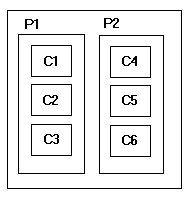
嵌套具有不同水平和垂直组合的多个面板会产生类似于 GridBagLayout 的效果,但没有那么复杂。该图显示了两个水平排列的面板,每个面板包含 3 个垂直排列的组件。
BoxLayout 管理器是用一个轴参数构造的,该参数指定将完成的布局类型。有四种选择:
X_AXIS - 组件从左到右水平排列。
Y_AXIS - 组件从上到下垂直布局。
LINE_AXIS- 根据容器的ComponentOrientation属性,组件的布局方式与单词在一行中的布局方式相同。如果容器的ComponentOrientation是水平的,则组件水平放置,否则它们垂直放置。对于水平方向,如果容器的ComponentOrientation是从左到右,则组件从左到右布局,否则从右到左布局。对于垂直方向,组件总是从上到下布局。
PAGE_AXIS组件的布局方式与文本行在页面上的布局方式相同,基于容器的ComponentOrientation属性。如果容器的ComponentOrientation是水平的,则组件垂直放置,否则它们水平放置。对于水平方向,如果容器的ComponentOrientation是从左到右,则组件从左到右布局,否则从右到左布局。对于垂直方向,组件总是从上到下布局。
对于所有方向,组件的排列顺序与它们添加到容器中的顺序相同。
BoxLayout 尝试以首选宽度(水平布局)或高度(垂直布局)排列组件。对于水平布局,如果不是所有组件的高度都相同,BoxLayout 会尝试使所有组件与最高组件一样高。如果对于特定组件而言这不可能,则 BoxLayout 会根据组件的 Y 对齐方式垂直对齐该组件。默认情况下,组件的 Y 对齐为 0.5,这意味着组件的垂直中心应与其他具有 0.5 Y 对齐的组件的垂直中心具有相同的 Y 坐标。
同样,对于垂直布局,BoxLayout 尝试使列中的所有组件与最宽的组件一样宽。如果失败,它会根据它们的 X 对齐方式将它们水平对齐。对于 PAGE_AXIS 布局,水平对齐是基于组件的前缘完成的。换句话说,如果容器的 ComponentOrientation 是从左到右,则 X 对齐值 0.0 表示组件的左边缘,否则表示组件的右边缘。
许多程序不直接使用 BoxLayout,而是使用 Box 类。 Box 类是使用 BoxLayout 的轻量级容器。它还提供了方便的方法来帮助您更好地使用 BoxLayout。将组件添加到多个嵌套框是获得所需排列的有效方法。
有关更多信息和示例,请参阅 如何使用BoxLayout,The Java Tutorial. 中的一个部分
Warning: 此类的序列化对象将与未来的 Swing 版本不兼容。当前的序列化支持适用于运行相同版本 Swing 的应用程序之间的短期存储或 RMI。从 1.4 开始,对所有 JavaBeans 的长期存储的支持已添加到 java.beans 包中。请参阅 XMLEncoder 。
- 自从:
- 1.2
- 参见:
-
字段摘要
字段 -
构造方法总结
构造方法 -
方法总结
修饰符和类型方法描述voidaddLayoutComponent(Component comp, Object constraints) 不被这个类使用。voidaddLayoutComponent(String name, Component comp) 不被这个类使用。final intgetAxis()返回用于布置组件的轴。floatgetLayoutAlignmentX(Container target) 返回容器沿 X 轴的对齐方式。floatgetLayoutAlignmentY(Container target) 返回容器沿 Y 轴的对齐方式。final Container返回使用此布局管理器的容器。voidinvalidateLayout(Container target) 表明一个子级已经改变了它的布局相关信息,因此任何缓存的计算都应该被刷新。voidlayoutContainer(Container target) 由 AWT 调用当需要对指定的容器进行布局时。maximumLayoutSize(Container target) 返回目标容器可用于布置其包含的组件的最大尺寸。minimumLayoutSize(Container target) 返回布置指定目标容器中包含的组件所需的最小尺寸。preferredLayoutSize(Container target) 给定指定目标容器中的组件,返回此布局的首选尺寸。void不被这个类使用。
-
字段详细信息
-
X_AXIS
public static final int X_AXIS指定组件应从左到右布局。- 参见:
-
Y_AXIS
public static final int Y_AXIS指定组件应从上到下布局。- 参见:
-
LINE_AXIS
public static final int LINE_AXIS指定组件应按照目标容器的ComponentOrientation属性确定的一行文本的方向进行布局。- 参见:
-
PAGE_AXIS
public static final int PAGE_AXIS指定组件应按照目标容器的ComponentOrientation属性确定的线条流经页面的方向进行布局。- 参见:
-
-
构造方法详细信息
-
BoxLayout
创建一个布局管理器,它将沿给定轴布置组件。- 参数:
target——需要布局的容器axis- 布置组件的轴。可以是以下之一:BoxLayout.X_AXIS, BoxLayout.Y_AXIS, BoxLayout.LINE_AXIS或BoxLayout.PAGE_AXIS- 抛出:
AWTError- 如果axis的值无效
-
-
方法详情
-
getTarget
返回使用此布局管理器的容器。- 返回:
- 使用此布局管理器的容器
- 自从:
- 1.6
-
getAxis
public final int getAxis()返回用于布置组件的轴。返回以下之一:BoxLayout.X_AXIS, BoxLayout.Y_AXIS, BoxLayout.LINE_AXIS或BoxLayout.PAGE_AXIS- 返回:
- 用于布置组件的轴
- 自从:
- 1.6
-
invalidateLayout
表明一个子级已经改变了它的布局相关信息,因此任何缓存的计算都应该被刷新。当对容器调用 invalidate 方法时,AWT 会调用此方法。由于invalidate方法可能会被异步调用到事件线程,所以这个方法可能会被异步调用。
- 指定者:
invalidateLayout在接口LayoutManager2中- 参数:
target- 受影响的容器- 抛出:
AWTError- 如果目标不是指定给 BoxLayout 构造函数的容器
-
addLayoutComponent
不被这个类使用。- 指定者:
addLayoutComponent在接口LayoutManager中- 参数:
name- 组件名称comp- 组件
-
removeLayoutComponent
不被这个类使用。- 指定者:
removeLayoutComponent在接口LayoutManager中- 参数:
comp- 组件
-
addLayoutComponent
不被这个类使用。- 指定者:
addLayoutComponent在接口LayoutManager2中- 参数:
comp- 组件constraints- 约束
-
preferredLayoutSize
给定指定目标容器中的组件,返回此布局的首选尺寸。- 指定者:
preferredLayoutSize在接口LayoutManager中- 参数:
target——需要布局的容器- 返回:
- 维度 >= 0 && <= Integer.MAX_VALUE
- 抛出:
AWTError- 如果目标不是指定给 BoxLayout 构造函数的容器- 参见:
-
minimumLayoutSize
返回布置指定目标容器中包含的组件所需的最小尺寸。- 指定者:
minimumLayoutSize在接口LayoutManager中- 参数:
target——需要布局的容器- 返回:
- 维度 >= 0 && <= Integer.MAX_VALUE
- 抛出:
AWTError- 如果目标不是指定给 BoxLayout 构造函数的容器- 参见:
-
maximumLayoutSize
返回目标容器可用于布置其包含的组件的最大尺寸。- 指定者:
maximumLayoutSize在接口LayoutManager2中- 参数:
target——需要布局的容器- 返回:
- 维度 >= 0 && <= Integer.MAX_VALUE
- 抛出:
AWTError- 如果目标不是指定给 BoxLayout 构造函数的容器- 参见:
-
getLayoutAlignmentX
返回容器沿 X 轴的对齐方式。如果框是水平的,将返回默认对齐方式。否则,将返回沿 X 轴放置子项所需的对齐方式。- 指定者:
getLayoutAlignmentX在接口LayoutManager2中- 参数:
target- 容器- 返回:
- 对齐 >= 0.0f && <= 1.0f
- 抛出:
AWTError- 如果目标不是指定给 BoxLayout 构造函数的容器
-
getLayoutAlignmentY
返回容器沿 Y 轴的对齐方式。如果框是垂直的,将返回默认对齐方式。否则,将返回沿 Y 轴放置子项所需的对齐方式。- 指定者:
getLayoutAlignmentY在接口LayoutManager2中- 参数:
target- 容器- 返回:
- 对齐 >= 0.0f && <= 1.0f
- 抛出:
AWTError- 如果目标不是指定给 BoxLayout 构造函数的容器
-
layoutContainer
由 AWT 调用当需要对指定的容器进行布局时。- 指定者:
layoutContainer在接口LayoutManager中- 参数:
target- 要布局的容器- 抛出:
AWTError- 如果目标不是指定给 BoxLayout 构造函数的容器
-