- 所有已实现的接口:
ImageObserver,MenuContainer,Serializable,Accessible
JFrame、JDialog、JWindow、JApplet 和 JInternalFrame 在幕后使用的轻量级容器。有关根窗格提供的功能的面向任务的信息,请参阅 如何使用根窗格,The Java Tutorial 中的一个部分。
下图显示了使用根窗格的类之间的关系。
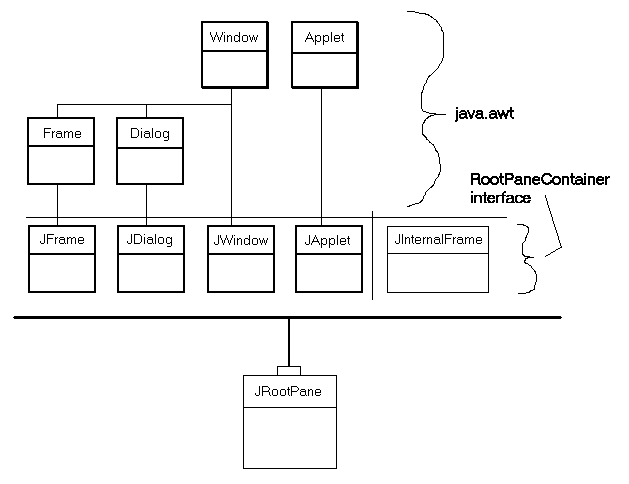
JFrame、JDialog、JWindow 和 JApplet)与它们扩展的 AWT 类的关系。这四个组件是 Swing 库中唯一的重量级容器。还显示了轻量级容器 JInternalFrame。所有这五个 JFC/Swing 容器都实现了 RootPaneContainer 接口,并且它们都将它们的操作委托给了一个 JRootPane(顶部有一个小“句柄”)。
笔记:JComponent方法getRootPane可用于获取包含给定组件的JRootPane。
示例:
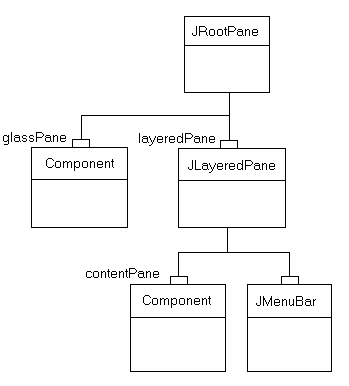
JRootPane 的结构。 JRootpane 由一个 glassPane、一个可选的 menuBar 和一个 contentPane 组成。 ( JLayeredPane 管理 menuBar 和 contentPane 。) glassPane 位于一切之上,它处于拦截鼠标移动的位置。由于 glassPane(与 contentPane 一样)可以是任意组件,因此也可以设置 glassPane 进行绘图。 glassPane 上的线条和图像可以覆盖下面的框架,而不受其边界的限制。
尽管 menuBar 组件是可选的,但 layeredPane、contentPane 和 glassPane 始终存在。尝试将它们设置为 null 会产生异常。
要将组件添加到 JRootPane(可选菜单栏除外),请将对象添加到 JRootPane 的 contentPane,如下所示:
rootPane.getContentPane().add(child);相同的原则适用于设置布局管理器、删除组件、列出子项等。所有这些方法都在
contentPane 而不是 JRootPane 上调用。
笔记:如果在contentPane的默认布局管理器是BorderLayout管理器。但是,JRootPane使用自定义LayoutManager。因此,当您想要更改添加到JRootPane的组件的布局管理器时,请务必使用如下代码:rootPane.getContentPane().setLayout(new BoxLayout());
JRootPane 上设置了 JMenuBar 组件,则它位于框架的上边缘。调整 contentPane 的位置和大小以填充剩余区域。 (JMenuBar 和 contentPane 添加到 JLayeredPane.FRAME_CONTENT_LAYER 层的 layeredPane 组件。)
layeredPane 是 JRootPane 中所有子项的父级——既是菜单的直接父级,也是添加到 contentPane 的所有组件的祖父级。它是 JLayeredPane 的一个实例,它提供了在多个层添加组件的能力。在使用菜单弹出窗口、对话框和拖动时,此功能非常有用——在这些情况下,您需要将一个组件放置在窗格中所有其他组件的顶部。
glassPane 位于 JRootPane 中所有其他组件之上。这提供了一个方便的地方,可以在所有其他组件之上进行绘制,并且可以拦截鼠标事件,这对于拖动和绘制都很有用。开发人员可以在 glassPane 上使用 setVisible 来控制 glassPane 何时显示在其他子项之上。默认情况下,glassPane 是不可见的。
JRootPane 使用的自定义 LayoutManager 确保:
glassPane填充了JRootPane的整个可视区域(边界 - insets)。layeredPane填满了JRootPane的整个可视区域。 (边界 - insets)menuBar位于layeredPane的上边缘。contentPane填充整个可视区域,减去menuBar(如果存在)。
JRootPane 视图层次结构中的任何其他视图都将被忽略。
如果您将 LayoutManager 替换为 JRootPane ,您将负责管理所有这些视图。所以通常你会想要确保你改变了contentPane而不是JRootPane本身的布局管理器!
Swing 的绘画架构需要一个不透明的 JComponent 存在于所有其他组件之上的包含层次结构中。这通常通过内容窗格提供。如果替换内容窗格,建议您通过 setOpaque(true) 使内容窗格不透明。此外,如果内容窗格覆盖 paintComponent ,则需要在 paintComponent 中用不透明颜色完全填充背景。
Warning: Swing 不是线程安全的。有关详细信息,请参阅 Swing 的线程策略。
Warning: 此类的序列化对象将与未来的 Swing 版本不兼容。当前的序列化支持适用于运行相同版本 Swing 的应用程序之间的短期存储或 RMI。从 1.4 开始,对所有 JavaBeans 的长期存储的支持已添加到 java.beans 包中。请参阅 XMLEncoder 。
- 自从:
- 1.2
- 参见:
-
内部类总结
内部类修饰符和类型类描述protected class此类实现了对JRootPane类的辅助功能支持。protected class自定义布局管理器,负责 layeredPane、glassPane 和 menuBar 的布局。在类 javax.swing.JComponent 中声明的嵌套类/接口
JComponent.AccessibleJComponent在类 java.awt.Container 中声明的嵌套类/接口
Container.AccessibleAWTContainer -
字段摘要
字段修饰符和类型Field描述static final int用于 windowDecorationStyle 属性的常量。protected Container内容窗格。protected JButton当窗格具有焦点和特定于 UI 的操作(如按下进入键发生。static final int用于 windowDecorationStyle 属性的常量。static final int用于 windowDecorationStyle 属性的常量。static final int用于 windowDecorationStyle 属性的常量。protected Component重写菜单栏和内容窗格的玻璃窗格,因此它可以拦截鼠标移动等。static final int用于 windowDecorationStyle 属性的常量。protected JLayeredPane管理菜单栏和内容窗格的分层窗格。protected JMenuBar菜单栏。static final int用于 windowDecorationStyle 属性的常量。static final int用于 windowDecorationStyle 属性的常量。static final int用于 windowDecorationStyle 属性的常量。static final int用于 windowDecorationStyle 属性的常量。在类 javax.swing.JComponent 中声明的字段
listenerList, TOOL_TIP_TEXT_KEY, ui, UNDEFINED_CONDITION, WHEN_ANCESTOR_OF_FOCUSED_COMPONENT, WHEN_FOCUSED, WHEN_IN_FOCUSED_WINDOW在类 java.awt.Component 中声明的字段
accessibleContext, BOTTOM_ALIGNMENT, CENTER_ALIGNMENT, LEFT_ALIGNMENT, RIGHT_ALIGNMENT, TOP_ALIGNMENT在接口 java.awt.image.ImageObserver 中声明的字段
ABORT, ALLBITS, ERROR, FRAMEBITS, HEIGHT, PROPERTIES, SOMEBITS, WIDTH -
构造方法总结
构造方法 -
方法总结
修饰符和类型方法描述protected void重写以将玻璃组件的位置强制为零子组件。protected Container由构造方法调用以创建默认的contentPane。protected Component由构造方法调用以创建默认的glassPane。protected JLayeredPane由构造方法调用以创建默认的layeredPane。protected LayoutManager由构造方法调用以创建默认的layoutManager。获取与此JRootPane关联的AccessibleContext。返回内容窗格——包含以根窗格为父级的组件的容器。返回defaultButton属性的值。返回此JRootPane的当前玻璃窗格。从分层窗格返回菜单栏。获取根窗格使用的分层窗格。已弃用。getUI()返回呈现此组件的 L&F 对象。返回一个字符串,该字符串指定呈现此组件的 L&F 类的名称。int返回一个常量,标识JRootPane提供的窗口装饰类型。booleanglassPane和contentPane具有相同的边界,这意味着JRootPane不会平铺其子项,这应该返回 false。boolean如果此JRootPane的后代调用revalidate,则从此处开始验证。protected String返回此JRootPane的字符串表示形式voidsetContentPane(Container content) 设置内容窗格——包含根窗格父级组件的容器。voidsetDefaultButton(JButton defaultButton) 设置defaultButton属性,该属性确定此JRootPane的当前默认按钮。voidsetDoubleBuffered(boolean aFlag) 设置此组件是否应使用缓冲区进行绘制。voidsetGlassPane(Component glass) 将指定的Component设置为此根窗格的玻璃窗格。voidsetJMenuBar(JMenuBar menu) 添加或更改分层窗格中使用的菜单栏。voidsetLayeredPane(JLayeredPane layered) 为根窗格设置分层窗格。voidsetMenuBar(JMenuBar menu) 已弃用。从 Swing 版本 1.0.3 开始,由setJMenuBar(JMenuBar menu)取代。voidsetUI(RootPaneUI ui) 设置呈现此组件的 L&F 对象。voidsetWindowDecorationStyle(int windowDecorationStyle) 设置JRootPane应提供的窗口装饰类型(例如边框、用于关闭窗口的小部件、标题...)。voidupdateUI()将 UI 属性重置为当前外观的值。在类 javax.swing.JComponent 中声明的方法
addAncestorListener, addNotify, addVetoableChangeListener, computeVisibleRect, contains, createToolTip, disable, enable, firePropertyChange, firePropertyChange, fireVetoableChange, getActionForKeyStroke, getActionMap, getAlignmentX, getAlignmentY, getAncestorListeners, getAutoscrolls, getBaseline, getBaselineResizeBehavior, getBorder, getBounds, getClientProperty, getComponentGraphics, getComponentPopupMenu, getConditionForKeyStroke, getDebugGraphicsOptions, getDefaultLocale, getFontMetrics, getGraphics, getHeight, getInheritsPopupMenu, getInputMap, getInputMap, getInputVerifier, getInsets, getInsets, getListeners, getLocation, getMaximumSize, getMinimumSize, getNextFocusableComponent, getPopupLocation, getPreferredSize, getRegisteredKeyStrokes, getRootPane, getSize, getToolTipLocation, getToolTipText, getToolTipText, getTopLevelAncestor, getTransferHandler, getVerifyInputWhenFocusTarget, getVetoableChangeListeners, getVisibleRect, getWidth, getX, getY, grabFocus, hide, isDoubleBuffered, isLightweightComponent, isManagingFocus, isOpaque, isPaintingForPrint, isPaintingOrigin, isPaintingTile, isRequestFocusEnabled, paint, paintBorder, paintChildren, paintComponent, paintImmediately, paintImmediately, print, printAll, printBorder, printChildren, printComponent, processComponentKeyEvent, processKeyBinding, processKeyEvent, processMouseEvent, processMouseMotionEvent, putClientProperty, registerKeyboardAction, registerKeyboardAction, removeAncestorListener, removeNotify, removeVetoableChangeListener, repaint, repaint, requestDefaultFocus, requestFocus, requestFocus, requestFocusInWindow, requestFocusInWindow, resetKeyboardActions, reshape, revalidate, scrollRectToVisible, setActionMap, setAlignmentX, setAlignmentY, setAutoscrolls, setBackground, setBorder, setComponentPopupMenu, setDebugGraphicsOptions, setDefaultLocale, setEnabled, setFocusTraversalKeys, setFont, setForeground, setInheritsPopupMenu, setInputMap, setInputVerifier, setMaximumSize, setMinimumSize, setNextFocusableComponent, setOpaque, setPreferredSize, setRequestFocusEnabled, setToolTipText, setTransferHandler, setUI, setVerifyInputWhenFocusTarget, setVisible, unregisterKeyboardAction, update在类 java.awt.Container 中声明的方法
add, add, add, add, add, addContainerListener, addPropertyChangeListener, addPropertyChangeListener, applyComponentOrientation, areFocusTraversalKeysSet, countComponents, deliverEvent, doLayout, findComponentAt, findComponentAt, getComponent, getComponentAt, getComponentAt, getComponentCount, getComponents, getComponentZOrder, getContainerListeners, getFocusTraversalKeys, getFocusTraversalPolicy, getLayout, getMousePosition, insets, invalidate, isAncestorOf, isFocusCycleRoot, isFocusCycleRoot, isFocusTraversalPolicyProvider, isFocusTraversalPolicySet, layout, list, list, locate, minimumSize, paintComponents, preferredSize, printComponents, processContainerEvent, processEvent, remove, remove, removeAll, removeContainerListener, setComponentZOrder, setFocusCycleRoot, setFocusTraversalPolicy, setFocusTraversalPolicyProvider, setLayout, transferFocusDownCycle, validate, validateTree在类 java.awt.Component 中声明的方法
action, add, addComponentListener, addFocusListener, addHierarchyBoundsListener, addHierarchyListener, addInputMethodListener, addKeyListener, addMouseListener, addMouseMotionListener, addMouseWheelListener, bounds, checkImage, checkImage, coalesceEvents, contains, createImage, createImage, createVolatileImage, createVolatileImage, disableEvents, dispatchEvent, enable, enableEvents, enableInputMethods, firePropertyChange, firePropertyChange, firePropertyChange, firePropertyChange, firePropertyChange, firePropertyChange, firePropertyChange, getBackground, getBounds, getColorModel, getComponentListeners, getComponentOrientation, getCursor, getDropTarget, getFocusCycleRootAncestor, getFocusListeners, getFocusTraversalKeysEnabled, getFont, getForeground, getGraphicsConfiguration, getHierarchyBoundsListeners, getHierarchyListeners, getIgnoreRepaint, getInputContext, getInputMethodListeners, getInputMethodRequests, getKeyListeners, getLocale, getLocation, getLocationOnScreen, getMouseListeners, getMouseMotionListeners, getMousePosition, getMouseWheelListeners, getName, getParent, getPropertyChangeListeners, getPropertyChangeListeners, getSize, getToolkit, getTreeLock, gotFocus, handleEvent, hasFocus, imageUpdate, inside, isBackgroundSet, isCursorSet, isDisplayable, isEnabled, isFocusable, isFocusOwner, isFocusTraversable, isFontSet, isForegroundSet, isLightweight, isMaximumSizeSet, isMinimumSizeSet, isPreferredSizeSet, isShowing, isValid, isVisible, keyDown, keyUp, list, list, list, location, lostFocus, mouseDown, mouseDrag, mouseEnter, mouseExit, mouseMove, mouseUp, move, nextFocus, paintAll, postEvent, prepareImage, prepareImage, processComponentEvent, processFocusEvent, processHierarchyBoundsEvent, processHierarchyEvent, processInputMethodEvent, processMouseWheelEvent, remove, removeComponentListener, removeFocusListener, removeHierarchyBoundsListener, removeHierarchyListener, removeInputMethodListener, removeKeyListener, removeMouseListener, removeMouseMotionListener, removeMouseWheelListener, removePropertyChangeListener, removePropertyChangeListener, repaint, repaint, repaint, requestFocus, requestFocus, requestFocusInWindow, resize, resize, setBounds, setBounds, setComponentOrientation, setCursor, setDropTarget, setFocusable, setFocusTraversalKeysEnabled, setIgnoreRepaint, setLocale, setLocation, setLocation, setMixingCutoutShape, setName, setSize, setSize, show, show, size, toString, transferFocus, transferFocusBackward, transferFocusUpCycle
-
字段详细信息
-
NONE
public static final int NONE用于 windowDecorationStyle 属性的常量。表示JRootPane不应提供任何类型的窗口装饰。- 自从:
- 1.4
- 参见:
-
FRAME
public static final int FRAME用于 windowDecorationStyle 属性的常量。指示JRootPane应提供适合框架的装饰。- 自从:
- 1.4
- 参见:
-
PLAIN_DIALOG
public static final int PLAIN_DIALOG用于 windowDecorationStyle 属性的常量。指示JRootPane应提供适合对话框的装饰。- 自从:
- 1.4
- 参见:
-
INFORMATION_DIALOG
public static final int INFORMATION_DIALOG用于 windowDecorationStyle 属性的常量。指示JRootPane应提供适合用于显示信息性消息的对话框的装饰。- 自从:
- 1.4
- 参见:
-
ERROR_DIALOG
public static final int ERROR_DIALOG用于 windowDecorationStyle 属性的常量。指示JRootPane应提供适合用于显示错误消息的对话框的装饰。- 自从:
- 1.4
- 参见:
-
COLOR_CHOOSER_DIALOG
public static final int COLOR_CHOOSER_DIALOG用于 windowDecorationStyle 属性的常量。指示JRootPane应提供适合用于显示JColorChooser的对话框的装饰。- 自从:
- 1.4
- 参见:
-
FILE_CHOOSER_DIALOG
public static final int FILE_CHOOSER_DIALOG用于 windowDecorationStyle 属性的常量。指示JRootPane应提供适合用于显示JFileChooser的对话框的装饰。- 自从:
- 1.4
- 参见:
-
QUESTION_DIALOG
public static final int QUESTION_DIALOG用于 windowDecorationStyle 属性的常量。指示JRootPane应提供适合用于向用户提出问题的对话框的装饰。- 自从:
- 1.4
- 参见:
-
WARNING_DIALOG
public static final int WARNING_DIALOG用于 windowDecorationStyle 属性的常量。指示JRootPane应提供适合用于显示警告消息的对话框的装饰。- 自从:
- 1.4
- 参见:
-
contentPane
内容窗格。 -
layeredPane
管理菜单栏和内容窗格的分层窗格。 -
glassPane
重写菜单栏和内容窗格的玻璃窗格,因此它可以拦截鼠标移动等。 -
defaultButton
当窗格具有焦点和特定于 UI 的操作(如按下进入键发生。
-
-
构造方法详细信息
-
JRootPane
public JRootPane()创建一个JRootPane,设置它的glassPane、layeredPane和contentPane。
-
-
方法详情
-
setDoubleBuffered
public void setDoubleBuffered(boolean aFlag) 设置此组件是否应使用缓冲区进行绘制。如果设置为 true,则此组件的所有绘制都将在屏幕外绘制缓冲区中完成。屏幕外绘画缓冲区将被复制到屏幕上。如果Component被缓冲并且其祖先之一也被缓冲,则将使用祖先缓冲区。- 重写:
setDoubleBuffered在类JComponent中- 参数:
aFlag- 如果为真,则将此组件设置为双缓冲- 自从:
- 1.6
-
getWindowDecorationStyle
public int getWindowDecorationStyle()返回一个常量,标识JRootPane提供的窗口装饰类型。- 返回:
NONE、FRAME、PLAIN_DIALOG、INFORMATION_DIALOG、ERROR_DIALOG、COLOR_CHOOSER_DIALOG、FILE_CHOOSER_DIALOG、QUESTION_DIALOG或WARNING_DIALOG之一。- 自从:
- 1.4
- 参见:
-
setWindowDecorationStyle
@BeanProperty (expert =true, visualUpdate =true, enumerationValues ={"JRootPane.NONE","JRootPane.FRAME","JRootPane.PLAIN_DIALOG","JRootPane.INFORMATION_DIALOG","JRootPane.ERROR_DIALOG","JRootPane.COLOR_CHOOSER_DIALOG","JRootPane.FILE_CHOOSER_DIALOG","JRootPane.QUESTION_DIALOG","JRootPane.WARNING_DIALOG"}, description ="Identifies the type of Window decorations to provide") public void setWindowDecorationStyle(int windowDecorationStyle) 设置JRootPane应提供的窗口装饰类型(例如边框、用于关闭窗口的小部件、标题...)。默认是不提供窗口装饰 (NONE)。这只是一个提示,某些外观可能不支持这一点。这是绑定属性。
- 参数:
windowDecorationStyle- 不断识别提供的窗口装饰。- 抛出:
IllegalArgumentException- 如果style不是以下之一:NONE、FRAME、PLAIN_DIALOG、INFORMATION_DIALOG、ERROR_DIALOG、COLOR_CHOOSER_DIALOG、FILE_CHOOSER_DIALOG、QUESTION_DIALOG或WARNING_DIALOG。- 自从:
- 1.4
- 参见:
-
getUI
返回呈现此组件的 L&F 对象。- 重写:
getUI在类JComponent中- 返回:
LabelUI对象- 自从:
- 1.3
-
setUI
@BeanProperty (expert =true, hidden =true, visualUpdate =true, description ="The UI object that implements the Component\'s LookAndFeel.") public void setUI(RootPaneUI ui) 设置呈现此组件的 L&F 对象。- 参数:
ui-LabelUIL&F 对象- 自从:
- 1.3
- 参见:
-
updateUI
public void updateUI()将 UI 属性重置为当前外观的值。- 重写:
updateUI在类JComponent中- 参见:
-
getUIClassID
返回一个字符串,该字符串指定呈现此组件的 L&F 类的名称。- 重写:
getUIClassID在类JComponent中- 返回:
- 字符串“RootPaneUI”
- 参见:
-
createLayeredPane
由构造方法调用以创建默认的layeredPane。 Bt 默认创建一个新的JLayeredPane。- 返回:
-
默认
layeredPane
-
createContentPane
由构造方法调用以创建默认的contentPane。默认情况下,此方法创建一个新的JComponentadd 并将BorderLayout设置为其LayoutManager。- 返回:
-
默认
contentPane
-
createGlassPane
由构造方法调用以创建默认的glassPane。默认情况下,此方法会创建一个可见性设置为 false 的新JComponent。- 返回:
-
默认
glassPane
-
createRootLayout
由构造方法调用以创建默认的layoutManager。- 返回:
-
默认
layoutManager。
-
setJMenuBar
添加或更改分层窗格中使用的菜单栏。- 参数:
menu- 要添加的JMenuBar
-
setMenuBar
已弃用。从 Swing 版本 1.0.3 开始,由setJMenuBar(JMenuBar menu)取代。指定菜单栏值。- 参数:
menu- 要添加的JMenuBar。
-
getJMenuBar
从分层窗格返回菜单栏。- 返回:
-
窗格中使用的
JMenuBar
-
getMenuBar
已弃用。从 Swing 版本 1.0.3 开始,由getJMenuBar()取代。返回菜单栏值。- 返回:
-
窗格中使用的
JMenuBar
-
setContentPane
设置内容窗格——包含根窗格父级组件的容器。Swing 的绘画架构需要包含层次结构中的不透明
JComponent。这通常由内容窗格提供。如果您替换内容窗格,建议您将其替换为不透明的JComponent。- 参数:
content- 用于组件内容的Container- 抛出:
IllegalComponentStateException-(运行时异常)如果内容窗格参数为null
-
getContentPane
返回内容窗格——包含以根窗格为父级的组件的容器。- 返回:
-
包含组件内容的
Container
-
setLayeredPane
为根窗格设置分层窗格。分层窗格通常包含一个内容窗格和一个可选的JMenuBar。- 参数:
layered- 要使用的JLayeredPane- 抛出:
IllegalComponentStateException-(运行时异常)如果分层窗格参数为null
-
getLayeredPane
获取根窗格使用的分层窗格。分层窗格通常包含一个内容窗格和一个可选的JMenuBar。- 返回:
-
目前正在使用的
JLayeredPane
-
setGlassPane
将指定的Component设置为此根窗格的玻璃窗格。玻璃面板通常应该是一个轻量级、透明的组件,因为当根面板需要获取输入事件时,它就会变得可见。新玻璃板的可见性已更改以匹配当前玻璃板的可见性。这意味着当您想要更换玻璃板并使其可见时必须小心。以下任一方法都有效:
  root.setGlassPane(newGlassPane);
  newGlassPane.setVisible(true);
或:root.getGlassPane().setVisible(true); root.setGlassPane(newGlassPane);
- 参数:
glass-Component用作此JRootPane的玻璃板- 抛出:
NullPointerException- 如果glass参数是null
-
getGlassPane
返回此JRootPane的当前玻璃窗格。- 返回:
- 当前的 glass pane
- 参见:
-
isValidateRoot
public boolean isValidateRoot()如果此JRootPane的后代调用revalidate,则从此处开始验证。延迟请求再次布局组件及其后代。例如,对
revalidate的调用被向上推送到JRootPane或JScrollPane,因为这两个类都会覆盖isValidateRoot以返回 true。- 重写:
isValidateRoot在类JComponent中- 返回:
- true
- 参见:
-
isOptimizedDrawingEnabled
public boolean isOptimizedDrawingEnabled()glassPane和contentPane具有相同的边界,这意味着JRootPane不会平铺其子项,这应该返回 false。另一方面,glassPane通常是不可见的,因此如果glassPane不可见,它可以返回 true。因此,此处的返回值取决于glassPane的可见性。- 重写:
isOptimizedDrawingEnabled在类JComponent中- 返回:
- 如果此组件的子组件不重叠,则为真
-
setDefaultButton
@BeanProperty (description ="The button activated by default in this root pane") public void setDefaultButton(JButton defaultButton) 设置defaultButton属性,该属性确定此JRootPane的当前默认按钮。默认按钮是在 UI 定义的激活事件(通常是进入key) 出现在根窗格中,无论按钮是否具有键盘焦点(除非根窗格中有另一个组件使用激活事件,例如JTextPane)。要使默认激活起作用,按钮必须是激活发生时根窗格的已启用后代。要从此根窗格中删除默认按钮,请将此属性设置为null。- 参数:
defaultButton- 作为默认按钮的JButton- 参见:
-
getDefaultButton
返回defaultButton属性的值。- 返回:
-
当前默认按钮
JButton - 参见:
-
addImpl
重写以将玻璃组件的位置强制为零子组件。 -
paramString
返回此JRootPane的字符串表示形式。此方法仅用于调试目的,返回字符串的内容和格式可能因实现而异。返回的字符串可能为空,但可能不是null。- 重写:
paramString在类JComponent中- 返回:
-
这个
JRootPane的字符串表示。
-
getAccessibleContext
获取与此JRootPane关联的AccessibleContext。对于根窗格,AccessibleContext采用AccessibleJRootPane的形式。如有必要,将创建一个新的AccessibleJRootPane实例。- 指定者:
getAccessibleContext在接口Accessible中- 重写:
getAccessibleContext在类Component中- 返回:
-
一个
AccessibleJRootPane作为这个JRootPane的AccessibleContext
-
getJMenuBar()取代。